Don't have a paid plan? Join the Developer Program and provision a fully-featured sandbox for free.
Facts
- HTTP
- JavaScript
- Python
- Java
POST https://slack.com/api/admin.conversations.search

app.client.admin.conversations.search

app.client.admin_conversations_search

app.client().adminConversationsSearch
application/x-www-form-urlencoded application/json Arguments
Required arguments
tokenstringRequiredAuthentication token bearing required scopes. Tokens should be passed as an HTTP Authorization header or alternatively, as a POST parameter.
xxxx-xxxxxxxxx-xxxxOptional arguments
team_idsarrayOptionalComma separated string of team IDs, signifying the internal workspaces to search through.
T00000000,T00000001connected_team_idsarrayOptionalArray of encoded team IDs, signifying the external orgs to search through.
['T00000000','T00000001']querystringOptionalName of the the channel to query by.
announcementlimitintegerOptionalMaximum number of items to be returned. Must be between 1 - 20 both inclusive. Default is 10.
1020cursorstringOptionalSet cursor to next_cursor returned by the previous call to list items in the next page.
dXNlcjpVMEc5V0ZYTlo=search_channel_typesarrayOptionalThe type of channel to include or exclude in the search. For example private will search private channels, while private_exclude will exclude them. For a full list of types, check the Types section.
private,archivedsortstringOptionalPossible values are relevant (search ranking based on what we think is closest), name (alphabetical), member_count (number of users in the channel), and created (date channel was created). You can optionally pair this with the sort_dir arg to change how it is sorted
member_countnamesort_dirstringOptionalSort direction. Possible values are asc for ascending order like (1, 2, 3) or (a, b, c), and desc for descending order like (3, 2, 1) or (c, b, a)
descasctotal_count_onlybooleanOptionalOnly return the total_count of channels. Omits channel data and allows access for admins without channel manager permissions.
Usage info
This Admin API method searches for channels across an organization given a search query.
This admin scope is obtained through version two of the OAuth V2 flow, but there are a few additional requirements. The app requesting this scope must be installed by an admin or Owner of an Enterprise organization. Also, the app must be installed on the entire org, not on an individual workspace. See below for more details.
If the app is installed by an Org Admin or Owner, ensure the Channel Management settings provide the appropriate permissions. The Org Admin or Owner installing the app must have the Channel Management role, and must also be granted access to Public channels and Private channels within this role. If these criteria aren't met, the Org Admin or Owner will receive a not_allowed error when attempting to install an app.
Admin API endpoints reach across an entire Enterprise organization, not individual workspaces.
For a token to be imbued with Admin scopes, it must be obtained from installing an app on the entire Enterprise org, not just a workspace within the organization.
To configure and install an app supporting Admin API endpoints on your Enterprise organization:
- Create a new Slack app. Your app will need to be able to handle a standard OAuth 2 flow.
- In the app's settings, select OAuth & Permissions from the left navigation. Scroll down to the section titled Scopes and add the
admin.*scope you want. Click the Save Changes button. - In the app's settings, select Manage Distribution from the left navigation. Under the section titled Share Your App with Other Workspaces, make sure all four sections have the green check. Then click the green Activate Public Distribution button.
- Under the Share Your App with Your Workspace section, copy the Sharable URL and paste it into a browser to initiate the OAuth handshake that will install the app on your organization. You must be logged in as an admin or Owner of your Enterprise organization to install the app.
- Check the dropdown in the upper right of the installation screen to make sure you are installing the app on the organization, not an individual workspace within the organization. See the image below for a visual.
- Once your app completes the OAuth flow, you will be granted an OAuth token that can be used for calling Admin API methods for your organization.
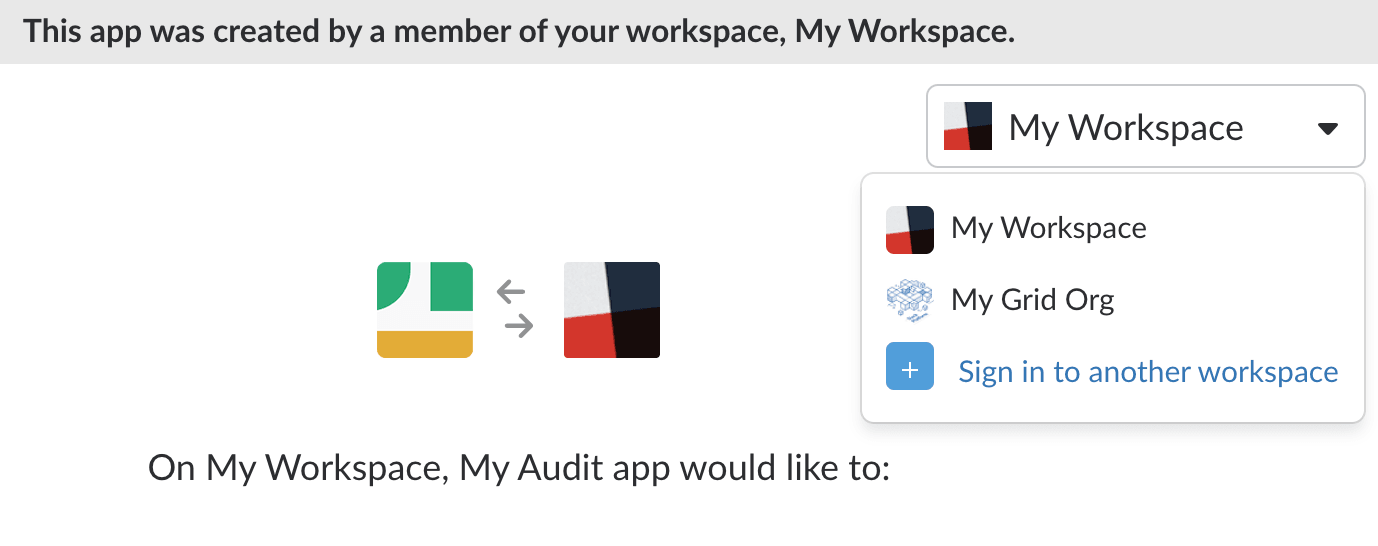
When installing an app to use an Admin API endpoint, be sure to install it on your Enterprise organization, not a workspace within the organization.
More on channel types
The search_channel_types allows an array of types to be passed, each of which filters the channels that the search returns. If you pass multiple types, the search occurs in channels that satisfy any of the types. You can pass the following values in your list of search_channel_types:
privateprivate_excludearchivedexclude_archivedprivate_exclude_archivedmulti_workspaceorg_wideexternal_shared_excludeexternal_sharedexternal_shared_privateexternal_shared_archivedexclude_org_shared
private will search private channels, and private_exclude will exclude them from the search. The other names follow the same patterns for channels connected to other organizations and archived channels.
Searching private channels with this method will only work if the user associated with the user token being used has permission to manage private channels on the org. By default, only the primary owner of the org has that level of permission. Missing this permission is a cause of the not_allowed error.
Response
Typical success response
{
  "ok": true,
  "conversations": [
    {
      "id": "GSEV0B5PY",
      "name": "privacy-channel",
      "purpose": "Group messaging with: @rita @nwhere @meanie",
      "member_count": -1,
      "created": 1578423973,
      "creator_id": "WPQ65MVKK",
      "is_private": true,
      "is_archived": true,
      "is_general": false,
      "last_activity_ts": 1583198954000200,
      "is_ext_shared": false,
      "is_global_shared": true,
      "is_org_default": false,
      "is_org_mandatory": false,
      "is_org_shared": true,
      "is_frozen": false,
      "connected_team_ids": [],
      "internal_team_ids_count": 4,
      "internal_team_ids_sample_team": "T013F30DBAB",
      "pending_connected_team_ids": [],
      "is_pending_ext_shared": false
    },
    {
      "id": "C013JDPD6CR",
      "name": "proj-decomposed-monolith",
      "purpose": "",
      "member_count": 1,
      "created": 1588786531,
      "creator_id": "WPQ65MVKK",
      "is_private": false,
      "is_archived": false,
      "is_general": false,
      "last_activity_ts": 1589854024000200,
      "is_ext_shared": false,
      "is_global_shared": false,
      "is_org_default": false,
      "is_org_mandatory": false,
      "is_org_shared": true,
      "is_frozen": false,
      "connected_team_ids": [],
      "internal_team_ids_count": 1,
      "internal_team_ids_sample_team": "TPQ67R81F",
      "pending_connected_team_ids": [],
      "is_pending_ext_shared": false
    }
  ],
  "next_cursor": "aWQ6Mw==",
  "total_count": 14823
}
The member_count field will return -1 when the channel is archived. Counts of 0 and above indicate current membership.
Errors
This table lists the expected errors that this method could return. However, other errors can be returned in the case where the service is down or other unexpected factors affect processing. Callers should always check the value of the ok parameter in the response.
access_deniedAccess to a resource specified in the request is denied.
accesslimitedAccess to this method is limited on the current network
account_inactiveAuthentication token is for a deleted user or workspace when using a bot token.
connected_team_passed_in_is_not_top_level_teamOne of the orgs provided in the external connected teams filter is not a top level team.
deprecated_endpointThe endpoint has been deprecated.
ekm_access_deniedAdministrators have suspended the ability to post a message.
enterprise_is_restrictedThe method cannot be called from an Enterprise.
external_team_not_connected_to_this_orgOne of the teams provided in the external connected teams filter is not connected to the org.
fatal_errorThe server could not complete your operation(s) without encountering a catastrophic error. It's possible some aspect of the operation succeeded before the error was raised.
feature_not_enabledThe token provided doesn't have access to this method.
internal_errorThe server could not complete your operation(s) without encountering an error, likely due to a transient issue on our end. It's possible some aspect of the operation succeeded before the error was raised.
invalid_arg_nameThe method was passed an argument whose name falls outside the bounds of accepted or expected values. This includes very long names and names with non-alphanumeric characters other than _. If you get this error, it is typically an indication that you have made a very malformed API call.
invalid_argumentsThe method was called with invalid arguments.
invalid_array_argThe method was passed an array as an argument. Please only input valid strings.
invalid_authThe token provided does not belong to an Enterprise organization, or a specified workspace wasn't part of this Enterprise.
invalid_authSome aspect of authentication cannot be validated. Either the provided token is invalid or the request originates from an IP address disallowed from making the request.
invalid_charsetThe method was called via a POST request, but the charset specified in the Content-Type header was invalid. Valid charset names are: utf-8 iso-8859-1.
invalid_cursorThe provided cursor is not valid, often due to not urlencoding query parameters.
invalid_form_dataThe method was called via a POST request with Content-Type application/x-www-form-urlencoded or multipart/form-data, but the form data was either missing or syntactically invalid.
invalid_post_typeThe method was called via a POST request, but the specified Content-Type was invalid. Valid types are: application/json application/x-www-form-urlencoded multipart/form-data text/plain.
invalid_search_channel_typeAn invalid search_channel_types arg was passed. Make sure there are no spaces between your args and that each is one of the enumerated options listed above.
invalid_sortThe provided sort argument wasn't valid.
invalid_sort_dirThe provided sort_dir argument wasn't valid.
method_deprecatedThe method has been deprecated.
missing_post_typeThe method was called via a POST request and included a data payload, but the request did not include a Content-Type header.
missing_scopeThe token used is not granted the specific scope permissions required to complete this request.
no_permissionThe workspace token used in this request does not have the permissions necessary to complete the request. Make sure your app is a member of the conversation it's attempting to post a message to.
not_allowedThe authenticated user does not have the permission to call this method.
not_allowed_token_typeThe token type used in this request is not allowed.
not_an_adminThe token provided is not associated with an Org Admin or Owner.
not_an_enterpriseThis endpoint can only be called by an Enterprise organization.
not_authedNo authentication token provided.
org_login_requiredThe workspace is undergoing an enterprise migration and will not be available until migration is complete.
ratelimitedThe request has been ratelimited. Refer to the Retry-After header for when to retry the request.
request_timeoutThe method was called via a POST request, but the POST data was either missing or truncated.
service_unavailableThe service is temporarily unavailable
team_access_not_grantedThe token used is not granted the specific workspace access required to complete this request.
team_added_to_orgThe workspace associated with your request is currently undergoing migration to an Enterprise Organization. Web API and other platform operations will be intermittently unavailable until the transition is complete.
team_not_foundOne of the workspaces provided in the list wasn't found.
token_expiredAuthentication token has expired
token_revokedAuthentication token is for a deleted user or workspace or the app has been removed when using a user token.
two_factor_setup_requiredTwo factor setup is required.